Showing posts with label hard drive. Show all posts

Sunday, November 5, 2023

NVME Drive Blazing Hot

My NVME drive in my old Acer 17 always ran 50C and pushed 60s. I added a heat sink and it helped a little. Yesterday it went crazy. I pulled it, put it in an external without the case. Plugged in a USB on PC2 and tried to copy user files. It would heat up and fail. Now I can't even get it to finish populating file explorer. Blazing hot to touch.

Looking for an ice pack to move the files.

Probably going to need "take ownership" to access the user files.

Continuing . . .

Monday, January 7, 2019

Hard Drive Test

https://sourceforge.net/projects/gsmartcontrol/

Lot's of ways to do this but I want to remember where this little open source, portable program is.
I would use this to test a new drive. Extended test.

Tuesday, August 9, 2016

How To Determine SATA Version

Crystal DiskInfo will tell you
The interface is first and the HD is second.

Tuesday, June 7, 2016

SSD Alignment and Provisioning

(I stopped the first test midway due to painful slowness)

After installing my new bargain basement ($49.99 after rebate) OCZ Trio N150 240GB, the read speeds were abysmal. I used AOMEI Backupper to clone the current OS.

First I fixed "over provisioning", which is simply leaving 7-10% unallocated space on the hard drive. I did not screen shot the results but it improved 10 to 20 MB/s. There is some controversy to this.

Then I fixed the alignment. I used AOMEI Partition Assistant to fix the alignment. The results were impressive. Minitool Partition Wizard also works for alignment.

This was done in my bottom feeding $250 Dell Optiplex 7010 Mini Tower i5. Dell disabled RAID in BIOS so I question if a PCIe NVMe would boot. Decided simple SATA SSD was sufficient.


Monday, June 6, 2016

SATA Internal Drives Showing As Removable

Add a new "Multi String Value" called "TreatAsInternalPort" to HKEY_LOCAL_MACHINE\SYSTEM\CurrentControlSet\Services\storahci\Parameters\Device
with the values "0|1|2|3|4|5|" (the | symbolizes a new line)

Saturday, May 28, 2016

Align Hard Drive Partition


AOMEI Partition Assistant Standard
or
Minitool Partition Wizard

It's free.

Check the alignment with AS-SSD

Also free.

I used it on an old Raptor drive and it worked. It trashed the drive letter and I used Windows install disk (USB actually) to fix. It recognized the problem on it's own and fixed it without any input from me.

Sadly I did not benchmark before fixing so don't know if it helped.

Thursday, June 19, 2014

AHCI Reminder To Self

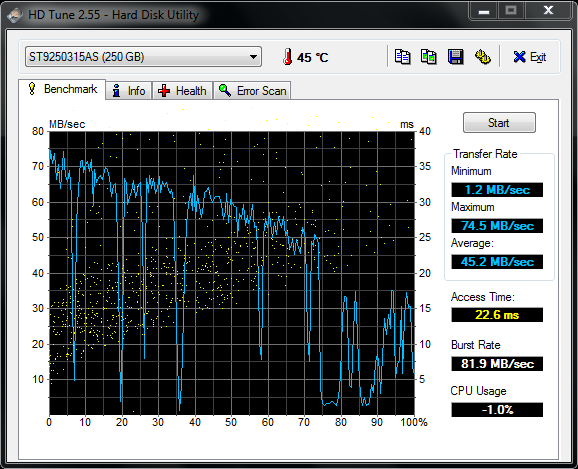
Just redid a Lenovo SL410 and the HD speed was hopeless. Lenovo doesn't list the SATA AHCI controller with its regular drivers so I didn't think of it. Why did they make me hunt it down?

OMG what is happening?

Oh yea, the AHCI controller

And disabling Windows write cache helps a bit maybe. I thought burst would go up but didn't.

Saturday, December 15, 2012

My New VelociRaptor 500 GB

I was using an old 74 GB Raptor as a boot drive on a shared family PC and it is to hard to keep people from installing things on the smaller drive. Besides it was outrageously noisy, especially when it gets close to full. So when Newegg wanted me to buy a new 500 GB VelociRaptor for $79, I just couldn't refuse.

This this is fairly quiet and very snappy but you can sometimes hear a little chatter noise. It does almost as well as some SSD drives I've seen and has a lot more space. Don't get me wrong, I'd take a good SSD any day but I'm very happy with this drive for the money.


Saturday, December 10, 2011

IDE to AHCI After Installing Windows

How to enable AHCI in Windows 7 RC after installation

*** The good news with Windows10 is you do not need to change anything in the OS. Just change the BIOS and reboot.
AHCI  (Advanced Host Controller Interface) enables native command queuing and hot-plugging through SATA host controllers (Serial-ATA) for your hard drives. In many scenarios it enables more efficient multi-tasking. Vista was the first Windows OS to support AHCI out of the box, where as Windows 7 does the same. But an issue with AHCI is that if you install the OS without enabling AHCI in the BIOS, enabling it after installation will render your OS unusable. This is because Windows disable the AHCI driver since it is not needed during the installation.
If you installed Windows and used IDE, the change is easy. Go to above link for directions. Improvements may be marginal but SSD's usually want AHCI, so if you are changing to SSD this quick change will help. Look for the reg hack for quick and easy.

Here is the difference with my 75GB Raptor. Seems too large a difference but seeing is believing. Windows experience index did not change but the Raptor has less chatter and things are perceptively smoother.
Before

After


Monday, November 21, 2011

Analyze Hard Drive Space

TDP x-Ray Lite | TDP
TDP x-Ray is a visual tool intended for disk space administration. It has been designed to simplify the work with high-capacity data storage containing millions of files. You shall
This can be use stand alone/portable by extracting the files. It is quite fast.

Sunday, September 19, 2010

Repartitioning Hard Drive

I have not repartitioned a Hard Drive in awhile and I wanted to put Windows7 dual boot on an XP system. I needed to change from logical to primary and resize. I pulled out my old trusty Gparted and bad news, I forgot my XP OS was on a RAID 0 setup. Even though I didn't want to put Win7 on the RAID, just running Gparted trashed my Master Boot Record. Easy to fix (thanks Hiren) but I had to find new software. Free resources for HD partitioning has come a long way. I grabbed Partition Wizard but Easeus would probably have done as well. Easeus seems more popular for some reason.

You can have 4 Primary partitions maximum, only 3 if you have any logical partitions. There is no limit to logical partitions.

Download links:

Nice thing about Win7 is it can go on any primary drive. Change your boot priority in BIOS setup to the Win7 drive. Then use EasyBCD (free) to add your existing XP install to the dual boot option.

Saturday, March 20, 2010

Hard Drive Recovery

My little developing list of hard drive recovery software (how soon I forget):
TestDisk
FileRecovey
Easeus
Using Linux

Hard Drive Dock (handy to have)

Wednesday, March 10, 2010

Delete A Hard Drive Securely

Leave No Trace: How to Completely Erase Your Hard Drives, SSDs and Thumb Drives - Data wiping - Gizmodo
Conclusion

We've highlighted a variety of free ways to protect data on castoff drives from being retrieved. As you can see, your best bet is to overwrite data directly, but you also might want to consider using a program such as SDelete to scramble filenames first and then use a disk wiper such as Eraser or WipeDisk to finish the job.

Comments: The article is long so here is what I do.
1. DBAN if your OS is trashed and you can not run windows or you wish to delete the OS drive. This simply boots and nukes the drive, thus the name. When? If discarding the drive or you want to still use the drive but be rid of any previous information.
2. DiskWipe if you can run from windows and wish to delete the none OS drive.

BitLocker

BitLocker: How to Protect Yourself Even If You Don’t Use It Many Windows users (including me) run local accounts and never intentionally ...