I did this registry entry and it worked. Not sure how durable this is but for now it worked.
This was on an old Windows 7 upgrade to 10 and the lack of desktop refresh carried over. I have not often experienced this on many setups but nice to have a fix if is happens.
Friday, December 27, 2019
Thursday, December 26, 2019
No DVD Drive In Windows 10
Windows 10 has a bad habit of not showing your DVD drive in Device Manager.
It may be installed but "hidden" . . . Do this.

There may be other reasons and my guess, I will have ample opportunity to discover fixes.
Yes, I know, DVDs are a mostly obsolete. I keep a portable USB DVD in the closet just in case. But if your machine has an internal DVD it should be accessible (for crying out loud).
It may be installed but "hidden" . . . Do this.

There may be other reasons and my guess, I will have ample opportunity to discover fixes.
Yes, I know, DVDs are a mostly obsolete. I keep a portable USB DVD in the closet just in case. But if your machine has an internal DVD it should be accessible (for crying out loud).
Tuesday, December 17, 2019


Sunday, December 15, 2019
Windows 7 Install To NVME SSD
I need to fine tune this description but . . .
Stuff you need:
1. This will insert USB 3 and NVME drivers into the Windows 7 ISO
https://www.gigabyte.com/Support/Utility/Motherboard?kw=windows+usb+installation+tool&p=1
This is for Gigabyte AMD boards. My board is Asus and yes Asus makes a version of this utility . . . and if anyone can figure out how to use it - let me know 😎
2. ImDisk Toolkit (If you don't have a thumb drive handy or want to speed things up) (hint: check the "removable media" box) (Or just use a flash drive and skip this step) It took 15 minutes on a RAM drive so good luck with a real thumb drive.
You may wish to not install shortcuts and context menu items. Access ImDisk through control panel.


3. ImgBurn (The driver insertion process extracts the ISO and you need to rebuild the ISO) (hint - etfsboot.com is the file to make the ISO bootable)
4. WinSetupFromUSB to create a multiple OS installation flash drive.
If you already have a multi boot flash drive with Win 7 install files, you can easily remove that file by deleting the setup files for Win 7 and editing the menu with Boot Ice. Then add the newly created version.
My NVME arrived today. Windows installed flawlessly. 😎😎😎
(If you don't count trying to find a Win7 LAN driver for a new motherboard. I had to use a USB WiFi dongle . . .)
I installed Win 7 first and updated so was stuck with MBR. Set BIOS to no UEFI.
Have only boot drive connected during install (old but true advice). You want the boot drive to be drive 0 in case you desire to convert to GPT later.
If installing 7 first or simply updating an existing Win7, you will have MBR. If you simply must have GPT for some reason - and your motherboard supports UEFI - Window 10 can convert MBR to GPT without data loss.

Why do I care?
Windows 7 is easily authenticated as genuine and updated to Windows 10.
If . . .
1. You have a product key sticker
...Remember to look inside the battery compartment 😎
2. Or use this crazy method. (Which is phenomenal)
...Using this method - Once Win 10 gets authorized, create an image. I tried reinstalling and the key Win 10 was using would not allow reinstall. I had to do the whole Win 7 setup dance again. Could have been a fluke but an image would save time.
3. On the other hand . . .
. . . We could use
. . .slmgr scripts (which actually work!).
https://www.youtube.com/watch?v=0wkHPQicR6s&t=196s
Smgr scripts last for limited periods. Not sure about auto renew yet.
To check your activation type
Window Key + R
slmgr.vbs /dli
If you have use the slmgr method you will see a result like this . . .

If it shows a partial product key you are golden with life long authentication.

4. Alternatively you can install an Auto KMS like Windows Toolkit or FrostRose (kmspico). Be careful where you download. (Hint = kmspico for Office 10 "psw 2016)
5. Or just buy a cheap key for around $15.
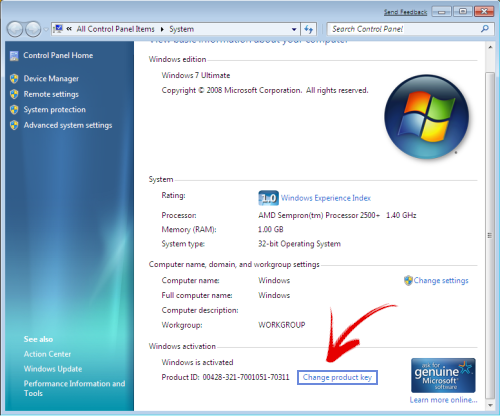
If "Change Producy Key" is not showing . . .
C:\Windows\System32> slmgr.vbs -ipk "INSERT-YOUR-PRODUCT-KEY"

Stuff you need:
1. This will insert USB 3 and NVME drivers into the Windows 7 ISO
https://www.gigabyte.com/Support/Utility/Motherboard?kw=windows+usb+installation+tool&p=1
This is for Gigabyte AMD boards. My board is Asus and yes Asus makes a version of this utility . . . and if anyone can figure out how to use it - let me know 😎
2. ImDisk Toolkit (If you don't have a thumb drive handy or want to speed things up) (hint: check the "removable media" box) (Or just use a flash drive and skip this step) It took 15 minutes on a RAM drive so good luck with a real thumb drive.
This Is An Outstanding Utility
You may wish to not install shortcuts and context menu items. Access ImDisk through control panel.

If flash drive is needed check "removable" otherwise leave unchecked.

3. ImgBurn (The driver insertion process extracts the ISO and you need to rebuild the ISO) (hint - etfsboot.com is the file to make the ISO bootable)
4. WinSetupFromUSB to create a multiple OS installation flash drive.
If you already have a multi boot flash drive with Win 7 install files, you can easily remove that file by deleting the setup files for Win 7 and editing the menu with Boot Ice. Then add the newly created version.
My NVME arrived today. Windows installed flawlessly. 😎😎😎
(If you don't count trying to find a Win7 LAN driver for a new motherboard. I had to use a USB WiFi dongle . . .)
I installed Win 7 first and updated so was stuck with MBR. Set BIOS to no UEFI.
Have only boot drive connected during install (old but true advice). You want the boot drive to be drive 0 in case you desire to convert to GPT later.
If installing 7 first or simply updating an existing Win7, you will have MBR. If you simply must have GPT for some reason - and your motherboard supports UEFI - Window 10 can convert MBR to GPT without data loss.

Why do I care?
Windows 7 is easily authenticated as genuine and updated to Windows 10.
If . . .
1. You have a product key sticker
...Remember to look inside the battery compartment 😎
2. Or use this crazy method. (Which is phenomenal)
...Using this method - Once Win 10 gets authorized, create an image. I tried reinstalling and the key Win 10 was using would not allow reinstall. I had to do the whole Win 7 setup dance again. Could have been a fluke but an image would save time.
3. On the other hand . . .
. . . We could use
. . .slmgr scripts (which actually work!).
https://www.youtube.com/watch?v=0wkHPQicR6s&t=196s
Smgr scripts last for limited periods. Not sure about auto renew yet.
To check your activation type
Window Key + R
slmgr.vbs /dli
If you have use the slmgr method you will see a result like this . . .

If it shows a partial product key you are golden with life long authentication.

4. Alternatively you can install an Auto KMS like Windows Toolkit or FrostRose (kmspico). Be careful where you download. (Hint = kmspico for Office 10 "psw 2016)
5. Or just buy a cheap key for around $15.
If "Change Producy Key" is not showing . . .
C:\Windows\System32> slmgr.vbs -ipk "INSERT-YOUR-PRODUCT-KEY"
User folders on different drive.
I resisted upgrading my existing PCs because I keep my user folders on drive D. Crazy thing I can't remember if Win 10 upgrade recognized that my user folders were on D: or if I needed to move the C: folders after upgrade. The good news is, it must have been no big deal or I would have remembered. I think Win 10 just recognizes your folders are not on C: and respects the setup.
Monday, December 9, 2019


Monday, November 25, 2019
Windows 10 Install
slmgr /xpr (shows if activated)
slmgr /dli (shows partial product key) (find full key in UVK system info)
slmgr /dlv (give more info on key)
wmic path softwareLicensingService get OA3xOriginalProductKey (this may read from BIOS so could be inaccurate if new version with different key is installed)
UKV (Ultra Virus Killer) under system info will show the key
-or-
regedit Computer\HKEY_LOCAL_MACHINE\SOFTWARE\Microsoft\Windows NT\CurrentVersion\SoftwareProtectionPlatform (BackupProductKeyDefault)
Need an earlier version of Windows 10? Use this batch script.
... Just Sayin' - After many flawless 7 to 10 upgrades, I have run into 3 no go machines. After several attempts at trouble shooting failed, here is my suggestion. Rejoice in the opportunity to do a clean install and call it a good day.
... Additional Install Info Here
First backup system with AOMEI Backupper.
AOMEI will ask for an email to enable download. I use yep@nope.com :) It will take anything.
Find and record your Windows product key.
*It may be on a sticker (best way)
* or try this https://nirsoft.net/utils/product_cd_key_viewer.html
(This should work because it reads the key stored in Windows registry)
Download Media Creation Tool
(Using a fresh version will diminish time for updating during install.)
https://www.microsoft.com/en-us/software-download/windows10
Start Media Creation Tool
Choose your flash drive as destination.
I never choose "use settings from this PC".
***I assume you have backed up all your data somewhere***
After completion you can start setup from the flash drive from within Windows 7.
This in-place upgrade works well but does not always work. Give it a shot.
If the in-place upgrade works you will not have to worry about the product key.
(A clean install is always preferable but don't fret over not doing the clean install. You can always do it later, once the authentication has been established.)
I boot from the created flash drive and run setup.exe.
For in-place upgrade things will be automatic.
If doing clean install:
*** Make certain only ONE hard drive is connected. ***
Choose "I don't have a product key".
Choose the version that matches your previously authorized version for which you have a key..
Choose "Custom Install"
Delete the partitions of your old Windows install.
Choose "Next" on the newly unallocated space.
Bingo - Installing Windows
LoL - Now we have some important setup to do . . . or so it says. Windows does it all.
After all that important work is done . . .
Create an off line account (the fine print at the bottom left)
No harm in using your MS account but I don't do it.
Now say "NO" to everything . . . or not
Now Wait until the system pops up.
No need to hurry authenticating but nice to know if it works.
Right Click on My PC
Click "Change My Product Key" lower right.
Copy/Paste the key into the dialog box - or type it :)
Good work. You are in a happy place.
You may (or not) wish to move user folders to D drive.
You may wish to "shut up" Windows 10
https://www.oo-software.com/en/shutup10
You may want to debloat Windows 10
http://bighugethingcomputing.blogspot.com/2019/04/windows-10-debloat.html
Windows 10 versions:
I have not had any problems with any version of Windows 10 but many people have. If you need to create (download) a specific version - try this https://pastebin.com/bBw0Avc4
This is an example of running the bat file

You may wish to delay feature updates. These are the big time updates which people find problematic. Pro versions allow long delays but the Home versions are much more limited in allowing the delay. Setting a metered download option is said to avoid feature updates in the Home versions.

Once you have a working system, back it up with AOMEI Backupper. It will ask for an email. I normally use yep@nope.com :) It will take anything.
Bonus info: Your entire old Windows system is saved on the boot drive as "Windows old" folder in case Windows needs to revert to the old system.. It is big and you will want to eventually delete the folder but don't hurry in case you need to revert. Use Windows own "Disk Clean-up" to remove the file. You can't simply delete it in a standard way.
Right Click on the boot drive:


Thursday, September 12, 2019
HFS - HTTP File Server
HFS - HTTP File Server:
Also available in Symenu.
If you are struggling to get Windows to access another PC on the network and need to move some files, this is a good temporary solution. Yes, you could just access the window share with the PC's IP but you do need to set up a share and then remove the share when you are done. With HFS just drag a fold in to share and when you close HFS, you are done.
The program is a single, stand-alone file. Just start the program.
Do this . . . Be sure the server is started.
If you are struggling to get Windows to access another PC on the network and need to move some files, this is a good temporary solution. Yes, you could just access the window share with the PC's IP but you do need to set up a share and then remove the share when you are done. With HFS just drag a fold in to share and when you close HFS, you are done.
The program is a single, stand-alone file. Just start the program.
Do this . . . Be sure the server is started.
Don't bother setting up user and password for local networks.
Drag folder or folders in and choose "real folder" option.


On the second PC, open a browser and enter the address of the server. Remember to include the port.
Example: 192.168.1.34:80
Download must be a file. Click on the file to open/download. It will not download a folder.
Example: You have a folder with MiniToolPartitionManager and want to transfer. You must zip the fold to a file. We could say it's a "file" server and not a "folder" server :)

Monday, September 9, 2019
MoCA Internet Over Coax
I have an Orbi mesh router and WiFi speed is fantastic. However, my Nvidia Shield WiFi was unsatisfactory and irritating. This did the trick. Does it totally cure the Shield's weak network speed?
No - but it is a dramatic improvement. I'm convinced that my Shield has a problem with network speed. I have several and they differ in how well they handle speed.
Actiontec Bonded MoCA 2.0
I receive Internet only from Spectrum. My TV comes from a roof UHF antenna.

One side of splitter goes to the MoCA IN
MoCA OUT goes to Modem
Connect NIC to a Router port

Other side of splitter goes to TV distribution.
I connected to an open port and it worked fine.
I did not need a second diplexer splitter as you might need if your TV and Internet signals conflict.

If you need to use a diplexer, here is a diagram. You can find this diagram in one buyer's comments on Amazon also.


Tuesday, August 27, 2019
Upgrading To Windows 10
* * * Use Windows Media Creation Tool * * *
2021-12-15 I assumed refurbs with XP license would not authenticate but I just did one. Trying a second one now. Second one didn't work but picked up the autopico volume license.
2021-12-15 I assumed refurbs with XP license would not authenticate but I just did one. Trying a second one now. Second one didn't work but picked up the autopico volume license.
slmgr /xpr
That is the short version. Don't bother waiting for Windows Update to offer it.
I bought a refurbished Lenovo X1 Carbon Gen 3 and it had a registered version of 8.1 Pro.

I normally do a clean install of Win 10 but wanted the upgrade experience.
Every site said update your current version and wait for Windows to offer upgrade.
Forget it . . .
Creation Tool will offer upgrade option in place. It worked fine.
You should grab the current Windows key just in case.
Use Nirsoft Keyfinder or look for a sticker on the PC.
If all else fails and you don't want to run your own KMS hack . . .
. . . buy a cheap key here. Many Youtubers offer further discount codes.
***And other ways to read the Original Windows key from BIOS
RWEverything (click ACPI icon from the top toolbar, and MSDM table in ACPI table)
or
Open a Command Prompt window and run the following command:
(wmic path softwarelicensingservice get OA3xOriginalProductKey)
or
FirmwareTablesView (read MSDM)
Need an earlier version of Windows 10? Use Rufus. It may take a little fiddling but the "Download" button is what you want.

I bought a refurbished Lenovo X1 Carbon Gen 3 and it had a registered version of 8.1 Pro.

I normally do a clean install of Win 10 but wanted the upgrade experience.
Every site said update your current version and wait for Windows to offer upgrade.
Forget it . . .
Creation Tool will offer upgrade option in place. It worked fine.
You should grab the current Windows key just in case.
Use Nirsoft Keyfinder or look for a sticker on the PC.
If all else fails and you don't want to run your own KMS hack . . .
. . . buy a cheap key here. Many Youtubers offer further discount codes.
***And other ways to read the Original Windows key from BIOS
RWEverything (click ACPI icon from the top toolbar, and MSDM table in ACPI table)
or
Open a Command Prompt window and run the following command:
(wmic path softwarelicensingservice get OA3xOriginalProductKey)
or
FirmwareTablesView (read MSDM)
Need an earlier version of Windows 10? Use Rufus. It may take a little fiddling but the "Download" button is what you want.

Tuesday, August 13, 2019
SSD Benchmarks Two Different PC's and More
A $24 Kingston A400 on USB3
(Different PC's will vary widely with same drive.)


If you are so lucky to have a mobo that handles Nvme
(Not impressive but a cheap one.)

Subscribe to:
Comments (Atom)